
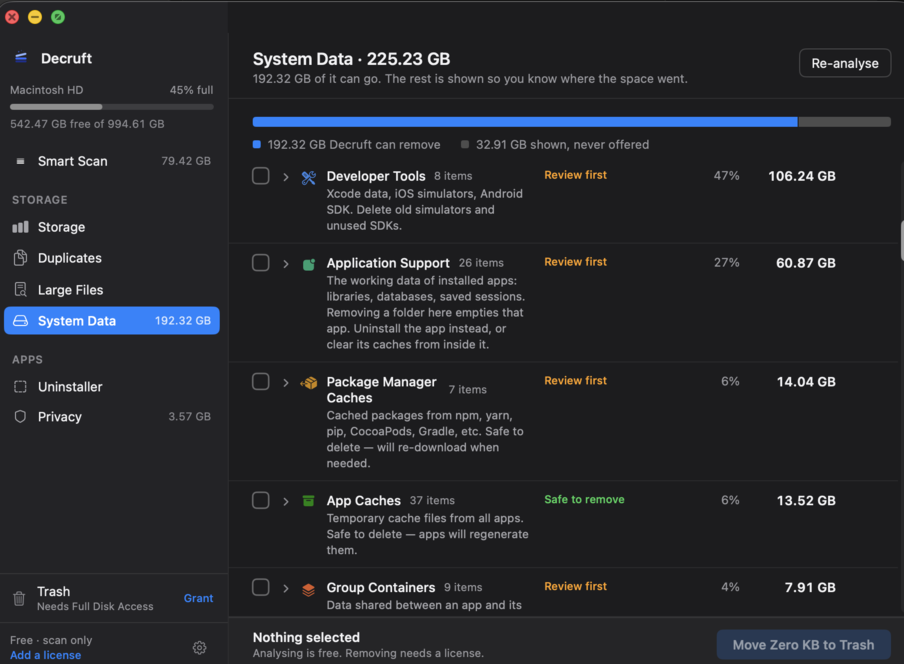
The System Data pane on my own Mac. Every row expands to the real paths.
Decruft finds the DerivedData, stale simulators, Docker layers and package-manager caches your tools leave behind. You see every path, its size and its age, before anything is deleted.
The System Data pane on my own Mac. Every row expands to the real paths.
Every build writes cache. Every simulator you booted once is still there. Every project you touched in 2023 still has a DerivedData folder. Nothing cleans up after itself, and macOS scatters the evidence between "System Data", "Developer" and "Mail" without telling you what any of it holds.
So you rm -rf ~/Library/Developer/Xcode/DerivedData at 2am when your build fails on a full disk, and hope you didn't just delete something that mattered.
Sizes measured on my own Mac, August 2026.
Plus a System Data analyser that names every category Storage settings hides, across System Data, Developer, Mail and your apps' own folders, a duplicate finder, a large-file finder and an app uninstaller.
Every item shows its full path, its size, and when it was last touched. Categories that hold anything you might want back (iPhone backups, Xcode archives, local snapshots) arrive unticked. There is no button that decides for you.
Removals go to the Trash, so a mistake is one Restore away. And Decruft flatly refuses to touch your documents, Mail, Photos, keychains or another user's account, whatever you select.
30-day refund, no reason required.
Scanning is free forever. A licence only unlocks cleaning.
Decruft scans and cleans entirely on your machine. Nothing about your disk is uploaded, and there is no account to create. There's no monthly cost on our side, so there's no monthly charge on yours.
The licence check is the only thing that touches the network, roughly once a week. Turn the Wi-Fi off and Decruft keeps working.
Decruft only offers caches and build artifacts your tools regenerate. Source code, git repos, documents, Mail and Photos are refused outright. Not "not selected by default". Refused. You approve every path, and removals go to the Trash.
Because the space is inside folders macOS keeps behind a permission prompt, like ~/Library/Developer. Cleaners that skip it report 0 KB and look broken. You grant it once, in System Settings, and you can revoke it whenever you like.
Yes. Decruft re-checks your licence about once a week, and a failed check never locks you out. It keeps working from the last successful check. Scanning and cleaning never need the network.
One licence covers 3 Macs. You can free a slot yourself from the Polar customer portal, or deactivate from inside the app under Settings → License.
Your licence keeps working. It doesn't expire, and an unreachable server never revokes it. If development stops, the last build stays yours.
Scan before you buy. That is why scanning is free. If you paid and it wasn't worth it, ask for a refund within 30 days and you'll get one, no reason required.
No. Scan results never leave your Mac. The only outbound requests are the weekly licence check and the update check. No analytics, no crash reporting, no account.
Each guide covers one thing that fills a developer's Mac: where it lives, what recreates it, and the command to clear it. No app needed.